
Add AI Answers to Your Site
Your visitors have questions. Your site has the answers — buried across dozens of pages. Edge Assist connects the two: instant, cited answers drawn from your own content, added with one script tag.
Why grounded answers beat a chatbot
Most site chatbots fail in one of two directions: they either answer from a generic model and confidently invent your prices, or they're a decision tree in a trench coat that punts everything to a contact form.
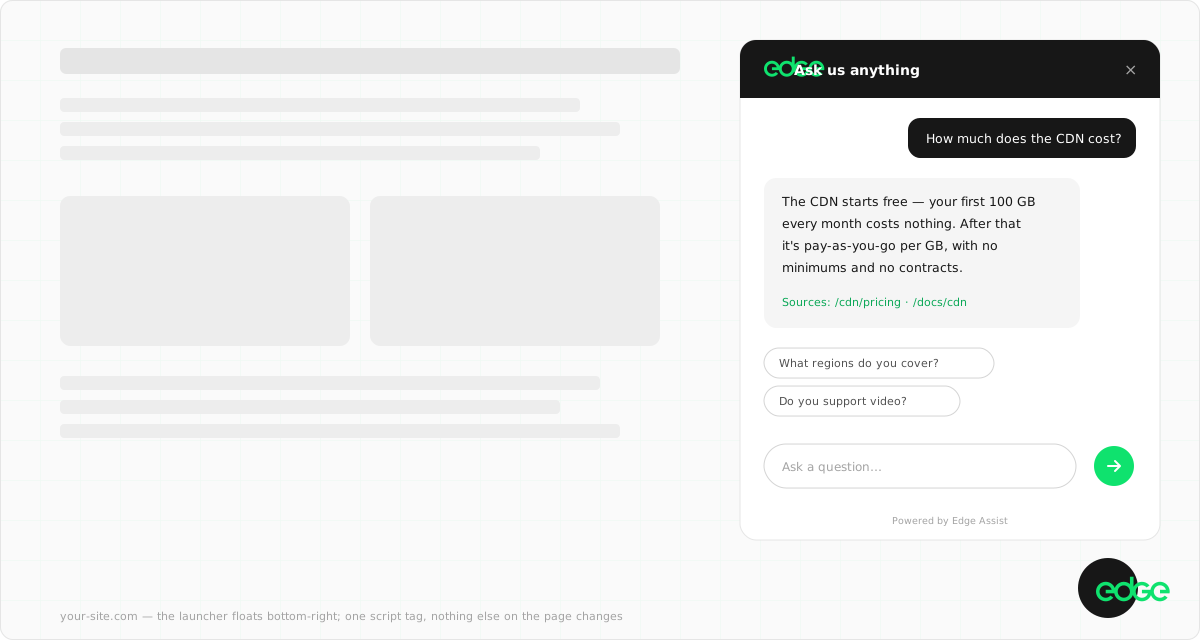
Assist is grounded: every answer is composed from passages retrieved out of your own ingested content, cited inline so the visitor can click through to the page a claim came from. When your content doesn't contain the answer, Assist says so and offers the closest page — or hands the conversation to a human. It never invents prices, limits, or SLAs.
And because visitor questions follow a power law, answered questions are cached per site: your most-asked questions get instant, word-for-word consistent answers, and the cache invalidates itself the moment your content changes.
1. Create a site and ingest your content
In the console,
create an Assist site with your hostname — you'll get a public sitekey
(ea_…). There's
no secret key to protect: the API only answers for your sitekey when the request comes
from your own domain.
Then tell Assist what it knows. Your site build publishes a small JSON index — chunks of page text with their URLs — and Assist re-fetches it hourly, re-indexing whenever the content hash changes:
{
  "hash": "3f9c2a71b4e8d05c",
  "chunks": [
    {
      "url": "/pricing",
      "title": "Pricing",
      "section": "pricing",
      "text": "Storage is billed at $0.015 per GB per month. There are no egress fees within…"
    }
  ]
}
A site rebuild is all it takes to update what Assist knows — and any content change automatically invalidates cached answers built on the old content. The full format and chunking guidance are in the ingestion docs.
2. Add one line to your pages
<script src="https://assist.edge.network/widget.js"
  data-sitekey="ea_your_sitekey" defer></script>
That's the integration. The widget is a single dependency-free script with styles isolated in a shadow root — your CSS can't break it, it can't leak into your page, and it never blocks your page load. Visitors get instant search results as they type, and a streamed, cited answer when they ask a question.
How it shows up is up to you:
| Surface | How |
|---|---|
| Floating launcher | The default — a pill in the corner of every page. Position, label, and colour are settings. |
| Search shortcut | Add data-hotkey="k" to the script tag and ⌘K opens site search with ask built in. |
| Your own buttons | Any element with data-edge-assist-open opens the assistant — nav icons, 404 pages, "Chat with us" links. |
| Inline embed | A <div data-edge-assist> renders the panel in the page flow, for help centres and support pages. |
| Hosted page | Zero integration: every site gets a full-page assistant at assist.edge.network you can link to. |
The assistant answering questions on this site right now — bottom-right corner, or press ⌘K — is this exact widget.
3. Steer it, then close the loop
Everything else is a setting in Control, not code. Three are worth doing on day one:
- Suggested questions — up to four one-click chips shown before the first question. Seed them with the questions you most want to answer well (pricing, getting started, your differentiator).
- Handoff email — enables "Need a human?". The visitor leaves their address, the whole conversation lands in your inbox, and replying to the email reaches them directly. An AI answer that knows when to get out of the way is what makes visitors trust the rest.
- The question log — every question is logged, answered or not. Unanswered questions are a literal to-do list for your content: each one is something a real visitor wanted to know and your site didn't say.
What it costs
One unit: the answered question. 250 are free every month, search is free and unlimited forever, and beyond the allowance it's $0.01 per question — no plans, no seats, no per-page fees. If you never set a usage budget, the widget simply falls back to search-only at the cap and resumes next month.
For scale: a docs site answering 2,000 questions a month pays $17.50. Comparable dedicated AI-answer products start at $150–500 per month before a single question is asked. Worked examples are on the pricing page.